Best Kindle Holders with Remote Page Turners
Discover the best Kindle accessories for a more comfortable reading experience. Our top picks include flexible Kindle holders, secure mounts, and remote page turners for effortless hands-free reading.
We may earn a commission from links on this page.

Top Picks Compared
1. Stouchi Gooseneck Kindle Holder with Remote Page Turner STOUCHI | 2. PlusAcc Kindle Holder with Remote Page Turner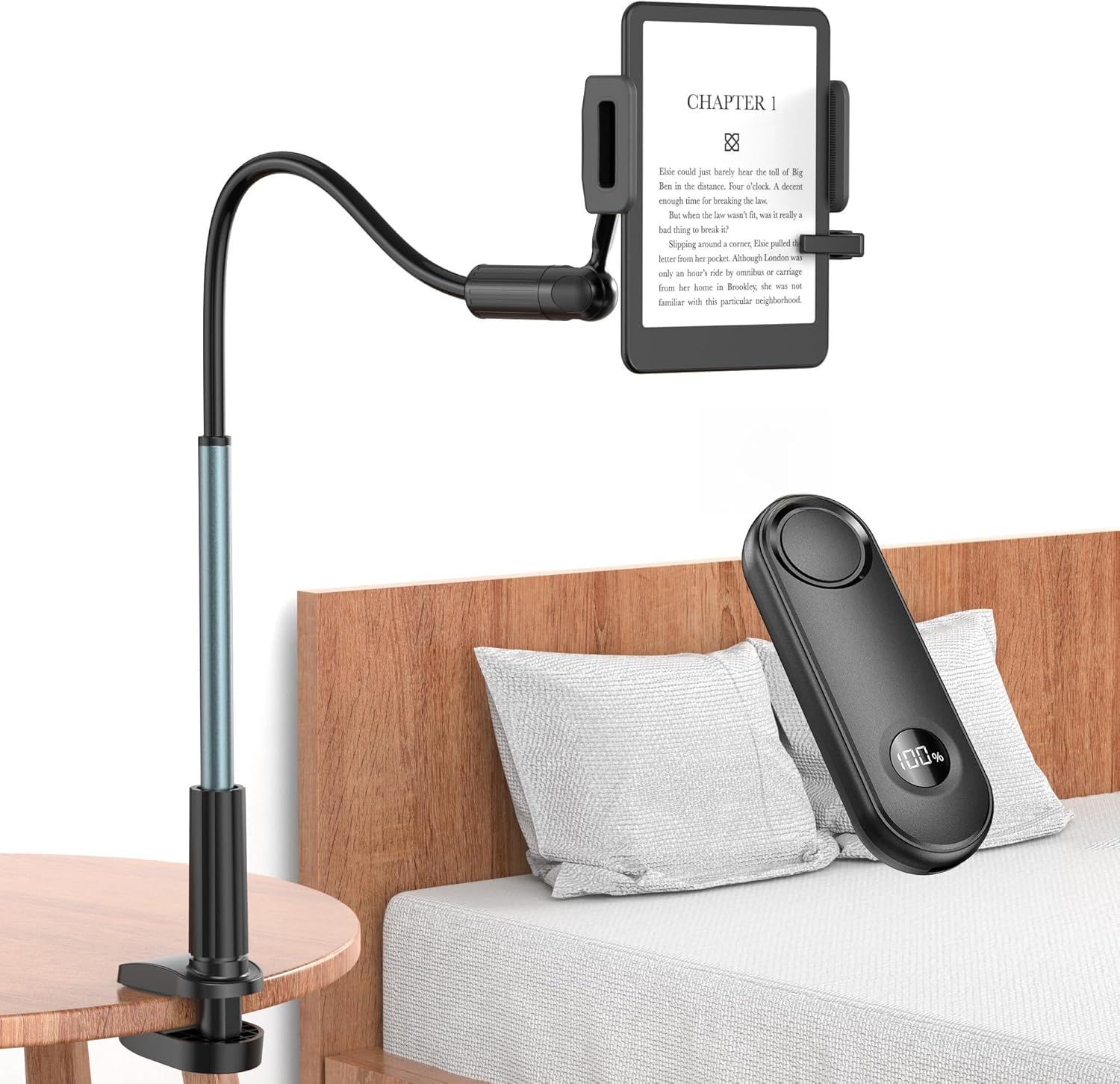 PLUSACC | |
|---|---|---|
| Our Score | 9.8 | 9.5 |
| Deal | — | — |
| Type | Gooseneck holder | Gooseneck holder |
| Device Range | 4.7-8.7" wide | Kindle/Kobo/phone (no tablets) |
| Remote Page Turner | 2-in-1 magnetic charging | Included |
| Arm | Reinforced no-sag | 360° metal support tube |
| Best For | Overall hands-free reading | Best value |

Kindle Holder with Remote Page Turner Buying Guide
A hands-free Kindle holder can reduce the need to grip an e-reader for long periods and make reading more comfortable in bed, on a sofa, at a desk, or on compatible exercise equipment. A remote page turner adds convenience by letting you advance pages without reaching toward the screen. The right setup depends on exact device dimensions, case thickness, mounting surface, arm stiffness, clamp range, viewing position, and whether the remote works with the screen technology and reading app you use.
Verify Device Compatibility First
Compatibility should be checked by physical dimensions and supported models, not by the word Kindle alone. Measure the device with its case installed and compare width, thickness, weight, bezel shape, and button placement with the holder specifications. The Stouchi model lists compatibility with devices approximately 4.7 to 8.7 inches wide and includes selected e-readers, phones, and small tablets. The PlusAcc listing explicitly excludes tablets and several older Kindle, Fire HD, and Kobo models. Remove a bulky folio case if the clamp or remote sensor cannot make secure contact.
Understand How Remote Page Turners Work
Many e-reader page turners use a small clip that touches the capacitive screen and a handheld remote that triggers that contact. This design can work without pairing directly to the Kindle, but the screen clip must sit over the correct page-turn area. Thick bezels, raised cases, screen protectors, reading orientation, or app controls can affect placement. Confirm whether the remote turns pages forward only or supports additional actions, and recharge both components according to the instructions before a long reading session.
Gooseneck Stiffness and Stability
A flexible arm must balance adjustability with enough resistance to hold the device. A soft arm is easy to reposition but may sag or bounce, while a reinforced arm can remain stable but require two hands and more force to bend. Shape the arm before placing the device into the holder, support the base while adjusting it, and avoid repeatedly bending one narrow section. Heavier devices create more leverage and need a shorter, well-supported arm position to reduce movement.
Clamp Range and Mounting Surface
Measure the desk, nightstand, bed frame, shelf, or treadmill support where the base clamp will attach. The surface must fall within the clamp opening and provide a firm, flat edge. Thick upholstery, rounded rails, unstable furniture, glass without manufacturer approval, and soft padded headboards may not hold safely. Silicone pads can reduce slipping and scratches, but the clamp still needs sufficient contact. Tighten it securely without crushing delicate furniture, and inspect the mount periodically during use.
Position for Comfortable Reading
Place the screen at a comfortable distance and angle that keeps the neck neutral and reduces glare. Lying flat with a device directly above the face may feel convenient, but the mount must be exceptionally secure and inspected before every session. A slightly offset position can reduce the chance of the device falling directly toward the user. Keep the arm out of walking paths, avoid blocking access to bed controls or medical equipment, and never allow the holder to interfere with exercise-machine operation.
Holder Grip and Device Protection
The device clamp should hold the e-reader without pressing power buttons, volume controls, charging ports, or the remote page-turn sensor. Soft contact pads help prevent scratches, but they should remain clean and intact. Test the grip close to a soft surface before positioning the device higher. Recheck the clamp after changing orientation or removing a case. Do not exceed the listed device size or weight, and replace the holder if joints, springs, pads, or plastic components become loose or damaged.
Noise and Bedtime Use
A quiet remote is valuable when reading beside a sleeping partner. Button feel, relay sound, and the screen clip can all contribute noise, so test the setup before relying on it at night. Lower the e-reader brightness, use a warm display mode when available, and secure charging cables so they cannot become tangled. A remote with magnetic charging or a dedicated storage point is easier to keep available, but small removable pieces should remain away from children and pets.
Maintenance and Long-Term Use
Check base-clamp tension, arm joints, device pads, remote battery level, and charging cables regularly. Dust or skin oils on the remote's screen contact can interfere with page turning, so clean it using the approved method. Avoid storing the gooseneck under continuous extreme bends, and do not force it beyond its intended range. If the mount begins to drift, crack, or loosen, stop using it above a person until the problem is corrected.
FAQ
It depends on the combined width and thickness of the Kindle and case. Bulky folio cases can weaken the holder grip or prevent the page-turner clip from touching the screen. Measure the complete device and compare it with the stated range; remove the case if the manufacturer recommends it.
Many Kindle page turners use a screen-contact clip controlled by a separate remote and do not pair directly with the e-reader. Designs vary, so follow the product instructions. The clip must align with the page-turn area and maintain proper contact with the capacitive screen.
The Stouchi holder lists support for compatible devices within its stated 4.7-to-8.7-inch width range, including selected small tablets. The PlusAcc listing explicitly says it is not for tablets. Always confirm size and weight rather than assuming compatibility from the product category.
A reinforced arm uses stiffness to resist sagging and bouncing after the device is positioned. Adjust it with two hands before loading the e-reader, support the base, and form broad curves instead of sharply bending one point. Excessive force or repeated tight bends may damage the arm.
Any overhead mount carries risk if the base, arm, or device clamp loosens. Attach it only to a firm compatible surface, stay within the size and weight limits, test the grip near a soft surface, and inspect every connection regularly. An offset position can reduce direct fall risk.
Get weekly top picks
Data-ranked products delivered to your inbox every week. Skip the research, get the winners.
No spam ever. Unsubscribe anytime. We respect your inbox.