Best Webcams
Discover top-rated webcams for meetings, gaming, and content creation with 4K resolution, sharp image quality, reliable autofocus, and enhanced audio.
We may earn a commission from links on this page.


Top Picks Compared
1. UGREEN FineCam Pro 4K Webcam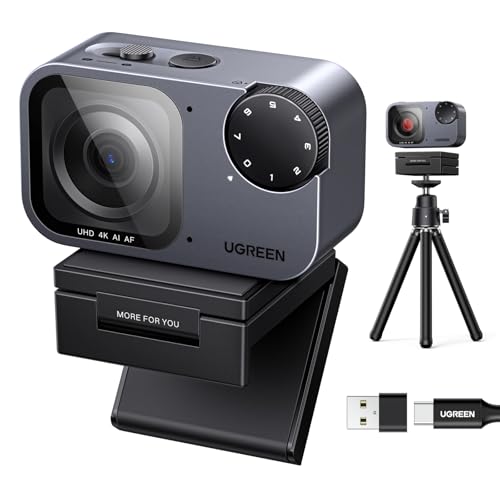 UGREEN | 2. EMEET NOVA 4K Webcam EMEET | 3. AnkerWork C310 4K Webcam ANKERWORK | 4. OBSBOT Meet 2 4K Webcam OBSBOT | 5. Insta360 Link 2 PTZ 4K Webcam INSTA360 | |
|---|---|---|---|---|---|
| Our Score | 9.9 | 9.8 | 9.7 | 9.6 | 9.5 |
| Deal | — | — | — | — | — |
| Resolution | 4K 30fps | 4K 30fps | 4K / 12MP | 4K Ultra HD | 4K HDR |
| Frame Rate | 30fps | 30fps | 30fps | 30fps | 30fps |
| Sensor | CMOS | CMOS + PDAF | 12MP CMOS | ½-inch CMOS | CMOS PDAF |
| Autofocus | Fast AF + face exposure | PDAF 73° FOV | AI real-time | Yes | PDAF low-light |
| Microphone | Dual AI noise reduction | Dual, up to 8 ft range | AI optimized | Built-in | AI noise cancellation |
| Best For | Overall 4K meetings | PDAF precision focus | High-res AI processing | Large sensor detail | PTZ low-light HDR |

Webcam Buying Guide
Choose a webcam based on resolution, frame rate, sensor size, autofocus, field of view, microphone quality, mounting options, and software compatibility. Lighting and internet upload speed can affect real-world quality as much as the camera specification.
- 1080p is sufficient for routine meetings, while 4K provides extra detail and cropping flexibility for streaming and content creation.
- A narrow field of view suits one person, while wider lenses better accommodate groups but may reveal more of the room.
- Check autofocus behavior, low-light performance, privacy controls, operating-system support, and compatibility with your meeting or streaming software.
FAQ
Most meeting platforms and connections work well at 1080p. A 4K webcam is more useful for cropping, recording, streaming, or maintaining detail on large displays.
Thirty frames per second is adequate for meetings and general use. Sixty frames per second produces smoother motion for streaming, demonstrations, and gaming, but may require lower resolution and more bandwidth.
Autofocus is useful when you move, hold objects toward the camera, or change distance frequently. A stable fixed-focus webcam can still work well for a consistent seated position.
Built-in microphones are convenient for calls, but a dedicated USB microphone or headset usually provides clearer and more consistent audio for streaming, recording, or noisy rooms.
Place a soft light in front of you, avoid bright windows behind you, position the camera near eye level, clean the lens, and use a wired or stable high-speed network connection when possible.
Get weekly top picks
Data-ranked products delivered to your inbox every week. Skip the research, get the winners.
No spam ever. Unsubscribe anytime. We respect your inbox.